
Intro
Buying technology for a child can feel like a practical way to support learning, connection, creativity, or independence. Yet the most expensive or advanced device is not necessarily the safest or most useful choice. A product may create privacy risks, encourage sleep disruption, exceed a child's developmental readiness, or place more supervision demands on a family than expected.
The goal is not to avoid technology. It is to match each purchase to the child's age, abilities, health needs, family routines, and digital environment. Careful evaluation before purchase can prevent avoidable problems and make it easier for parents to establish realistic boundaries from the beginning.
Highlights
A device should solve a clear family need rather than be purchased solely because it is popular or heavily marketed.
Age ratings do not replace evaluation of maturity, privacy settings, connectivity, or the level of supervision required.
Connected products can collect sensitive information, transmit audio or video, or create physical safety concerns that are easy to overlook.
A technology purchase should include a plan for charging, updates, parental controls, sleep protection, and eventual repair or disposal.
Buying before identifying the need
One of the most common mistakes is purchasing a device before defining the problem it is meant to solve. A child may not need a smartwatch if the actual concern is occasional communication after school. A tablet may be unnecessary if a school already provides a managed device. A voice assistant may add convenience for adults while offering little meaningful benefit to a young child.
Before buying, write down the intended use in concrete terms: homework, emergency contact, travel, communication with relatives, music, creative work, or a specific accessibility need. Then consider how often the device will be used, who will maintain it, and whether a lower-tech alternative would meet the same goal. Practical family guidance recommends considering whether a child genuinely needs a device and whether it fits the family’s circumstances.
Also calculate the full cost. Accessories, subscriptions, cellular service, replacement chargers, repairs, insurance, and in-app purchases can substantially change the financial picture. A product that is affordable at checkout may become difficult to sustain, creating conflict or unequal access among siblings.
Choosing technology that is too advanced
Advanced features can look attractive, but complexity increases the cognitive and supervisory burden. A device with unrestricted browsing, public messaging, location sharing, livestreaming, or open app installation may exceed a child’s ability to evaluate risk. The relevant question is not simply whether the child can operate the interface. It is whether the child can understand consent, advertising, scams, unwanted contact, permanence of online content, and the consequences of sharing information.
Age labels and marketing categories are useful starting points, but they are not individualized assessments. Developmental maturity, language skills, impulse control, executive functioning, and prior experience all matter. A child with attention difficulties, anxiety, autism, sensory sensitivities, or another health-related need may require different settings or a slower introduction. Parents should discuss individualized concerns with the child’s clinician, school team, or occupational therapist rather than assuming that a standard product recommendation will apply.
Look for granular controls: separate child accounts, content filters, purchase restrictions, contact approval, downtime settings, activity reports, and the ability to disable unused functions. A simpler device that can be configured well is often more appropriate than a feature-rich product that cannot be supervised reliably.
Overlooking privacy and cybersecurity
Connected devices can collect identifiers, location data, voice recordings, images, usage patterns, or information about household routines. Parents may focus on convenience and overlook what data the product gathers, where it is stored, how long it is retained, and whether it is shared with advertisers or other companies. The Federal Trade Commission’s research on smart-home technology highlights that parents consider privacy and security, but may underestimate how these risks intersect with children’s physical safety and family life.
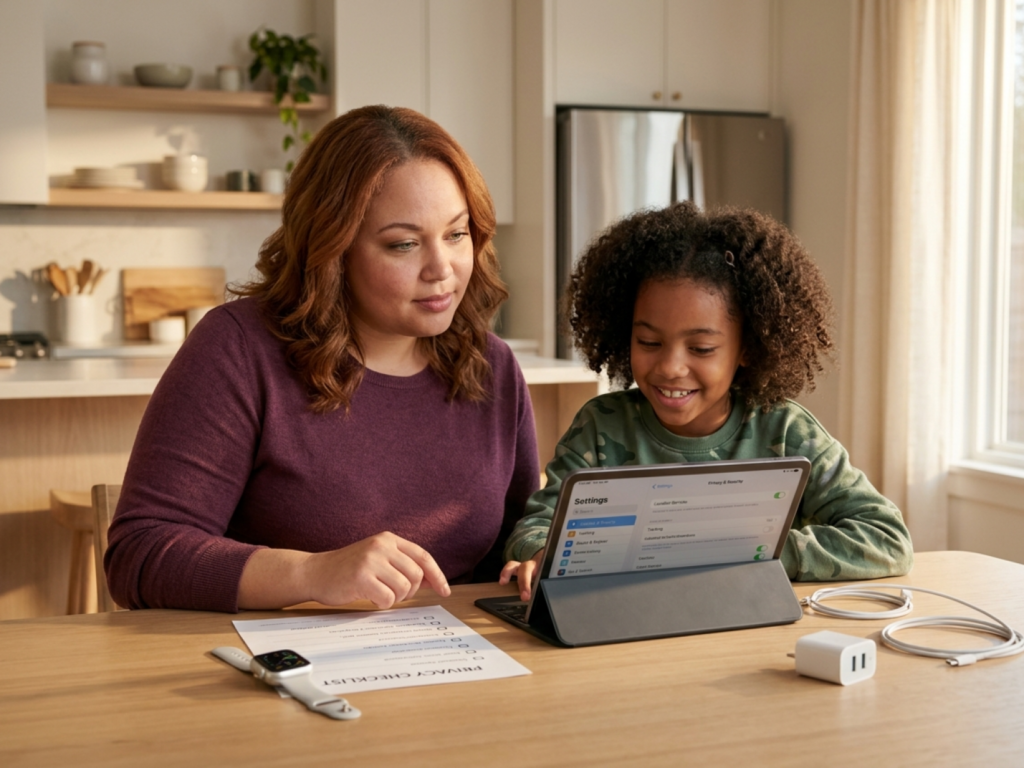
Before purchase, review the manufacturer’s privacy policy in practical terms. Check whether a child can use the product without creating a public profile, whether the microphone or camera can be physically disabled, and whether two-factor authentication is available. Change default passwords immediately, install security updates, and avoid connecting a child-focused device to more household systems than necessary.
Do not assume that a product marketed for children is automatically private. Some toys, cameras, baby monitors, speakers, and wearable devices can be compromised if accounts are poorly secured or software is no longer supported. Confirm the expected support period and the process for deleting an account and stored data. Family conversations about privacy should be ongoing, including what information may be shared, with whom, and why.
Ignoring physical and environmental safety
Technology can create risks beyond screen exposure. Cords may present strangulation or trip hazards, small detachable parts may be unsafe for younger children, and batteries can be hazardous if damaged, swallowed, or accessed. Smart-home devices may activate unexpectedly, become hot, break into sharp pieces, or interact with doors, locks, lights, or appliances. Charging equipment should be kept away from water, heat sources, and sleeping areas, and damaged batteries or cables should be removed from use.
Consider where the product will be used rather than evaluating it only in the shop. A tablet used in bed may interfere with sleep routines. Headphones used at high volume may contribute to noise exposure. A wearable with a tight band may irritate skin, while a camera or microphone placed in a private room may alter a child’s sense of security. Devices should not obstruct supervision, safe movement, or access to exits.
Read recall notices and manufacturer safety instructions, particularly when buying secondhand. Confirm that the device has not been modified, that its charger is compatible, and that the original safety features remain present. When a product is used for a child with a medical device, seizure disorder, hearing concern, skin condition, or sensory need, ask an appropriate healthcare professional about relevant precautions.
Buying without a routine and supervision plan
A device does not come with a complete family policy. Parents may buy a phone, console, or tablet and only later discover disagreements about bedtime, homework, messaging, purchases, or the location where it may be used. These conflicts are easier to prevent when expectations are established before the device arrives.
Decide who owns the account, who knows the passcode, where charging occurs, which apps are permitted, and how requests for new content are handled. Set up a screen-free bedtime routine and consider bedroom device boundaries if late-night use is likely. Notifications, autoplay, variable rewards, and social feedback can make stopping difficult, especially for children with limited impulse control.
Healthy technology habits children develop through predictable routines, adult modeling, and gradual autonomy rather than through one-time lectures. Parents should periodically review settings with the child, explain why controls exist, and make room for questions about upsetting content or unwanted contact. Co-viewing high-quality content and discussing online experiences can be more effective than relying only on surveillance.
Technology should not replace sleep, physical activity, school responsibilities, face-to-face relationships, or unstructured play. If use is associated with persistent insomnia, significant distress, headaches, vision complaints, social withdrawal, or impairment at school or home, consult a healthcare professional. Do not attempt to diagnose the cause from device use alone.
Forgetting accessibility, durability, and repair
A product may be technically suitable yet practically inaccessible. Small controls, low-contrast displays, complicated menus, loud alerts, bright lights, or constant vibration can be difficult for children with visual, auditory, motor, cognitive, or sensory differences. Ask whether the device supports text-to-speech, captions, adjustable font size, simplified interfaces, alternative input, volume limits, and predictable notification settings.
Durability is also part of safety and value. Examine whether the device can withstand the child’s normal environment, whether a protective case is compatible with ventilation, and whether replacement parts are available. A fragile product that frequently breaks may encourage unsafe repairs or cause repeated financial stress. Battery life matters as well: a device that dies during travel or after school may not meet the communication purpose for which it was purchased.
Think about the product’s lifespan and end-of-life process. Confirm that updates will continue, that data can be transferred or erased, and that the device can be recycled responsibly. For school-related technology, ask the school about loan programs, required specifications, accessibility support, and technical assistance before purchasing. Collaboration can prevent families from paying for features the child cannot use or the school does not support.
Using marketing as a substitute for judgment
Marketing often presents technology as educational, confidence-building, safer, or essential for belonging. Those claims may contain useful information, but they are not a substitute for evidence or individualized judgment. Educational value depends on the content, the child’s developmental stage, the quality of interaction, and what the device displaces. A product described as promoting independence may still require substantial adult monitoring.
Compare independent reviews, manufacturer documentation, privacy terms, return policies, and safety notices. Be cautious with testimonials that imply a device can prevent anxiety, improve behavior, enhance development, or manage a medical condition. Technology may support a care plan, but it should not be treated as a diagnostic or therapeutic replacement without guidance from a qualified professional.
Pause before buying during limited-time promotions or after a child sees influencer content. A short waiting period allows parents to check compatibility, family rules, and total cost. Involving an older child in the decision can teach consumer literacy: compare features, identify persuasive claims, assess privacy, and decide which functions are genuinely needed. The best purchase is one that remains manageable after the novelty has faded.
Safety concerns that need attention
- Do not place cameras, microphones, or connected devices in private spaces without considering consent, access controls, and data retention.
- Keep lithium batteries, chargers, cords, and detachable components away from younger children and inspect them for damage.
- Do not rely on parental controls as a replacement for supervision, communication, or age-appropriate education.
- Seek professional advice when technology use is associated with persistent sleep problems, distress, functional impairment, or physical symptoms.
- Check recalls, software support, privacy settings, and account security before giving a connected device to a child.
Tools & Assistance
- A pre-purchase checklist covering need, age fit, privacy, safety, accessibility, durability, and total cost
- Manufacturer privacy policies, account-security guidance, and software-support information
- School technology coordinators, accessibility staff, and device-loan programs
- A family technology agreement covering charging, sleep, messaging, purchases, and supervision
- A pediatrician or other qualified healthcare professional for individualized health and developmental questions
FAQ
Should parents avoid buying smart devices for children?
Not necessarily. The decision depends on the child's age, maturity, intended use, household needs, privacy protections, and supervision plan. A less connected product may be preferable when the same goal can be achieved with fewer risks.
Are parental controls enough to keep a child safe online?
No. Controls can reduce exposure and limit functions, but they may be bypassed, incomplete, or incorrectly configured. They work best alongside communication, supervision, software updates, and gradual teaching about privacy and online contact.
When should technology be kept out of a child's bedroom?
Many families benefit from charging devices outside bedrooms to protect sleep and reduce late-night use. The appropriate approach depends on age, health, communication needs, and family circumstances. Discuss persistent sleep concerns with a healthcare professional.
What should parents do if a child reacts badly to a new device?
Pause and observe the pattern without assuming a diagnosis. Check sleep, content, notifications, social interactions, accessibility settings, and the child's overall routine. If distress, physical complaints, or functional impairment persists, consult the child's healthcare professional.
Sources
- Internet Matters — Children's tech buying guide
- Federal Trade Commission — Child Safety in the Smart Home: Parents' Perceptions, ...
- EE — Six things to consider when choosing tech for your family
Disclaimer
This article is for general educational purposes and is not medical advice, diagnosis, or treatment. Consult a qualified healthcare professional for questions about a child's health, development, sleep, sensory needs, or technology-related symptoms.


















Please log in to leave a comment.