
Intro
A child’s study area should help learning feel possible, not painful. The right desk and chair can support attention, handwriting, reading, and computer use while reducing avoidable musculoskeletal strain.
Children grow quickly, and their proportions vary widely at the same age. Instead of buying only by grade level or style, choose furniture that can be adjusted to the child’s body, tasks, and sensory needs.
Highlights
Fit matters more than age labels: seat height, seat depth, desk height, and foot support should match the child using the furniture.
A supportive setup encourages neutral joint positioning, but children still need movement breaks because sustained sitting is physiologically demanding.
Adjustable furniture usually offers the best value because it can adapt during growth spurts and different learning tasks.
Comfort, safety, lighting, and organization all influence whether a study station is used consistently.
Start with the child, not the furniture label
Children’s furniture is often marketed by age, but chronological age is a poor proxy for body size, motor control, and learning needs. A supportive study station begins with direct observation: how the child sits, where the feet land, whether the shoulders rise toward the ears during writing, and whether the trunk slumps after a few minutes. Appropriately sized furniture can reduce awkward loading of the cervical spine, shoulders, wrists, hips, and knees.
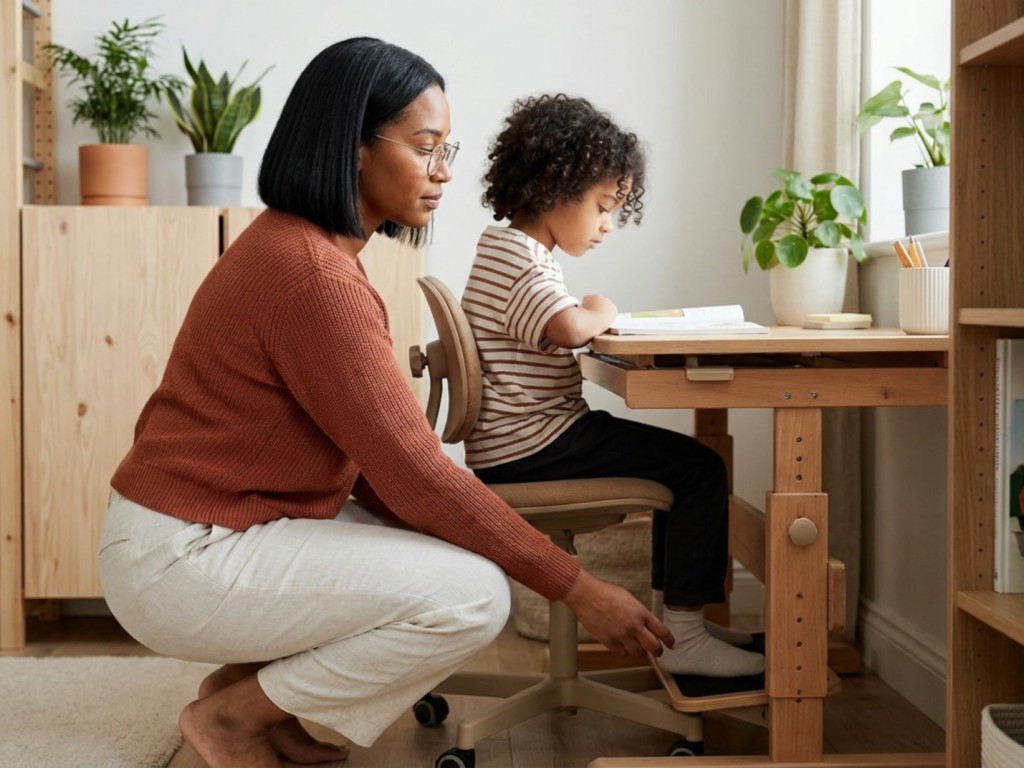
A good chair allows the child to sit with the pelvis supported, the back comfortably contacting the backrest, and the feet flat on the floor or on a stable footrest. Knees should usually be near a right angle, with the front edge of the seat not pressing into the back of the thighs. The desk surface should allow forearms to rest or hover comfortably without shoulder elevation. For handwriting, the elbows are typically bent around 90 degrees; for keyboarding, wrists should remain relatively neutral rather than extended upward.
Because children grow, fixed furniture that fits today may be wrong within a year. Adjustable height is often the most practical feature, especially for families creating a home learning setup for more than one child. If the ideal furniture is not available, small adaptations can help: a footrest, firm cushion, lowered keyboard tray, or separate writing surface may improve fit. The goal is not rigid perfect posture, but a flexible environment that reduces unnecessary strain.
Choosing the chair: stability, support, and adjustability
The chair is usually the foundation of the workstation. Look first at seat height. When the child is seated fully back, the feet should be supported and the thighs should not slope steeply upward. If the chair is too high, dangling feet increase pressure under the thighs and may encourage fidgeting, sliding forward, or sitting on one leg. If it is too low, the knees rise above the hips and the lower back may round.
Seat depth also matters. A deep seat can force a smaller child to perch at the front edge, losing back support. Ideally, there is a small gap between the seat edge and the back of the knees. The backrest should support the lumbar and thoracic spine without pushing the head forward. A gently contoured backrest is often enough; dramatic adult-style curves may not match a child’s proportions.
Armrests are optional and sometimes unhelpful. If they are too high, they elevate the shoulders and may contribute to neck fatigue. If they prevent the chair from moving close to the desk, they can make the child reach forward. Adjustable or removable armrests are preferable when available. Swivel chairs and wheeled chairs can be useful for older children who can use them safely, but for younger children or highly active children, a stable non-rolling chair may reduce falls and distraction.
For sensory regulation, some children benefit from carefully chosen movement, such as a wobble cushion or foot fidget, but these should not replace safe seating. If a child has hypotonia, hypermobility, neurodevelopmental differences, persistent pain, or marked postural fatigue, an occupational therapist, physiotherapist, or pediatric clinician can help individualize seating.
Choosing the desk: height, surface area, and task fit
A desk should support the tasks your child actually does: handwriting, drawing, reading, laptop use, tablet work, projects, and organization. The surface height should allow relaxed shoulders and comfortable elbow position. If the desktop is too high, the child may shrug the shoulders, extend the wrists, or lean the head forward. If it is too low, the child may collapse the trunk or bring the face very close to the page.
Surface area should be generous enough for a book, notebook, pencil case, and device without constant rearranging. Clutter competes for attention and can worsen awkward posture when a child twists around piles of supplies. Built-in storage can help, but drawers should not reduce legroom. Under the desk, the child needs enough space to place both feet comfortably and change position.
Adjustable desks are useful, but the adjustment mechanism should be safe, stable, and simple enough for adults to set accurately. Sit-stand desks can work for some older children, yet standing study is not automatically better. Prolonged standing can also cause fatigue, especially in the feet and lower limbs. A balance of sitting, standing, and movement breaks is usually more realistic than expecting one posture to solve everything.
For computer work, the screen should be positioned so the child does not constantly flex the neck. A laptop alone often creates a compromise: the screen is too low if the keyboard is comfortable. For longer sessions, consider an external keyboard and mouse so the screen can be raised while the arms stay relaxed.
Posture is dynamic: build in movement and visual comfort
Supportive furniture should make good posture easier, but no child should be expected to sit still for long periods. Children’s musculoskeletal and attentional systems benefit from position changes. Movement breaks can reduce static muscle loading, improve circulation, and help some children return to work with better concentration. A simple rhythm is to pause every 20 to 30 minutes for stretching, walking, or a brief active chore; younger children may need breaks more often.
Watch for compensations that suggest poor fit or fatigue: the child props the head on one hand, kneels on the chair, wraps feet around the chair legs, leans very close to the paper, or repeatedly complains of neck, back, wrist, or eye discomfort. These behaviors are not moral failings or laziness; they are useful clues. Sometimes the fix is as simple as foot support or better lighting.
Vision and ergonomics overlap. Poor illumination, glare, or an uncorrected visual problem can push a child into a forward-head posture. Place the desk where there is even light, ideally with natural light from the side rather than directly behind or in front of the screen. For evening study, use a lamp that lights the work surface without shining into the eyes. If the child squints, loses place while reading, develops headaches, or moves unusually close to the page, arrange an eye-care evaluation.
Materials, safety, and everyday durability
A child’s desk and chair should be sturdy enough for real life. Check for wobbling, sharp corners, unstable legs, pinch points, loose screws, and finishes that chip easily. Furniture should tolerate cleaning, spilled water, art materials, and repeated adjustments. Rounded edges are helpful for younger children, and anti-tip design is important for taller shelving or desks with upper storage.
Secondhand furniture can be an excellent option, but inspect it carefully. Confirm that height adjustments lock securely, wheels roll smoothly without tipping, and there are no exposed staples, splinters, cracked plastic, or rusted metal. This is part of secondhand child product safety: the item must be safe in its current condition, not just inexpensive or well reviewed. If you are buying online, measure the child first and compare those measurements with the product specifications rather than relying on photos.
Materials may matter for children with allergies, asthma, or sensory sensitivities in school supplies and furniture. Strong odors from new finishes, adhesives, or foams can be irritating for some children. Ventilate new furniture before prolonged use when practical, and follow manufacturer cleaning guidance. For children who chew objects, peel surfaces, or mouth items, discuss safer environmental strategies with a clinician or occupational therapist rather than assuming any product is fully risk-free.
Creating a study area the child will actually use
The best desk and chair are the ones that fit the child’s body and routines. Invite the child to participate in setup within safe boundaries: choosing where pencils go, adjusting the lamp, or testing chair height. This supports autonomy and may reduce resistance, especially for children who associate homework with discomfort or frustration.
Keep frequently used items within easy reach to avoid repetitive twisting and reaching. A school supply organization system can be simple: a small tray for current work, a container for writing tools, and a predictable place for chargers. Avoid over-decorating the desk if visual clutter is distracting. For some children, a calm wall, timer, or checklist is more useful than a themed setup.
Recheck the fit every few months and after growth spurts. Ask practical questions: Are the feet supported? Are the shoulders relaxed? Can the child write without leaning excessively? Does the screen height still make sense? Are there complaints of pain, numbness, tingling, headaches, or unusual fatigue? Persistent symptoms deserve medical attention. Furniture can reduce ergonomic stress, but it cannot diagnose or treat scoliosis, joint hypermobility disorders, vision problems, attention disorders, or chronic pain. A pediatrician, occupational therapist, physiotherapist, optometrist, or school ergonomics specialist can help when concerns continue.
When to get extra help
- Seek professional advice if pain, numbness, tingling, headaches, or visual strain persists despite basic adjustments.
- Do not use unstable cushions, stacked books, or makeshift platforms that can slip or tip.
- Avoid chairs that leave the child’s feet dangling for long study sessions.
- Check secondhand furniture for damage, recalls, loose hardware, and unsafe mechanisms before use.
- Consult a clinician or therapist for children with motor delays, hypermobility, hypotonia, scoliosis, or neurodevelopmental needs.
Tools & Assistance
- Measure the child’s seated knee height, elbow height, and thigh length before shopping.
- Use a stable footrest if the chair height is otherwise appropriate but the feet do not reach the floor.
- Schedule periodic workstation checks after growth spurts or changes in homework demands.
- Ask an occupational therapist or physiotherapist for individualized ergonomic guidance if discomfort continues.
FAQ
Is an expensive ergonomic chair necessary for a child?
Not always. Correct size, stable foot support, suitable seat depth, and adjustability are usually more important than price or adult-style ergonomic branding.
Should my child use a standing desk?
A standing option can be helpful for some children, but prolonged standing can also cause fatigue. Alternating positions and taking movement breaks is usually better than relying on one posture.
How often should I adjust the desk and chair?
Check fit every few months, after growth spurts, and whenever the child starts using a new device or complains of discomfort.
What if my child keeps fidgeting in the chair?
Fidgeting may reflect normal movement needs, poor furniture fit, sensory regulation needs, or fatigue. Improve fit first, add planned movement breaks, and seek professional advice if schoolwork or comfort is significantly affected.
Sources
- Cornell University Ergonomics Web — Workstation Ergonomics Guidelines for Computer Use by Children
- FIRA International — How good school furniture can make a difference
- New York Magazine — The Very Best Desk Chairs for Kids
Disclaimer
This article is for general educational purposes and is not a medical diagnosis or treatment plan. Consult a qualified healthcare professional for persistent pain, developmental concerns, visual symptoms, or individualized ergonomic needs.
















Please log in to leave a comment.