
Intro
A well-designed homework space can make schoolwork feel less physically demanding and emotionally tense. Children’s bodies are still growing, and long periods of sitting, reaching, slouching, squinting, or working in awkward positions can contribute to discomfort even when no injury is present.
Ergonomics is not about buying the most expensive chair or creating a perfect-looking room. It is about matching the task, furniture, technology, lighting, and routine to the child’s size, development, attention needs, and health history. Small adjustments can often make a large difference.
Highlights
The best homework setup supports a neutral posture: feet supported, hips and knees comfortable, elbows near a right angle, and the screen or page easy to see.
Children need movement breaks because even an excellent chair cannot make prolonged static sitting healthy or comfortable.
Lighting, screen position, clutter, and noise all affect visual strain, musculoskeletal comfort, and concentration.
Persistent pain, headaches, numbness, or avoidance of homework because of physical discomfort should be discussed with a healthcare professional.
Why ergonomics matters for homework
Children often do homework in spaces designed for adults: kitchen tables, high desks, couches, beds, or shared computer stations. These places may work briefly, but over time they can encourage flexed neck posture, rounded shoulders, unsupported feet, wrist extension, and excessive trunk rotation. The result may be fatigue, reduced concentration, irritability, or homework-related physical symptoms such as neck ache, back discomfort, eye strain, or headaches.
Ergonomics aims to reduce unnecessary mechanical load on the body. In medically literate terms, the goal is to decrease sustained static muscle contraction, compressive pressure points, extreme joint angles, and repetitive strain. For children, this also means respecting developmental variability. A 7-year-old and a 13-year-old may need very different seat heights, visual distances, and break intervals, even if they use the same table.
The aim is not rigid posture. Children naturally shift, fidget, and change position, and some movement is beneficial. A good homework station gives them a safe, supported baseline position and makes it easy to vary posture without collapsing over the work.
Start with the chair, desk, and feet
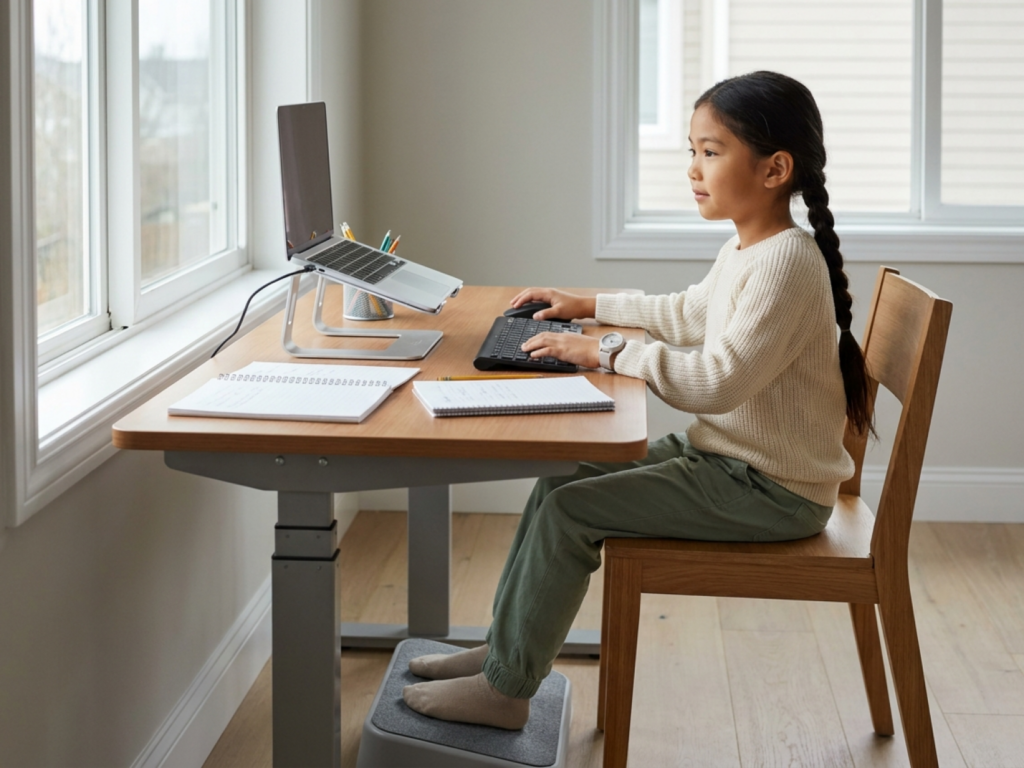
The most useful ergonomic rule is fit the furniture to the child, not the child to the furniture. When seated, the child’s feet should rest flat on the floor or on a stable footrest. Dangling feet increase pressure behind the thighs and can make children slide forward, round the spine, or brace with their toes. Hips and knees should be roughly at right angles, with the thighs supported and the lower back comfortable.
The work surface should allow the shoulders to relax. When the child’s forearms rest on the table or keyboard area, the elbows should be close to 90 degrees, not lifted toward the ears and not forced far below the desk. If the table is too high, raise the chair and add a footrest. If the table is too low, consider a different surface, a desk riser, or shorter study sessions in that location.
A chair does not need to be marketed as pediatric or orthopedic to be useful. Look for stable support, a seat depth that does not press hard into the back of the knees, and a backrest that allows the child to sit upright without strain. Cushions can help, but avoid unstable stacks that slide. For smaller children using adult chairs, a firm footstool and a cushion behind the back may provide a better fit.
Screen, book, and paper placement
Digital homework changes the workstation. A screen should usually be positioned so the top portion is near eye level and the child can look slightly downward rather than bending the neck. The screen should be directly in front of the child, not off to one side, to reduce sustained cervical rotation. A common practical guide is to keep the screen about an arm’s length away, then adjust for comfort, font size, and visual needs.
Laptops create a common ergonomic conflict: if the keyboard is comfortable, the screen is often too low; if the screen is raised, the keyboard becomes awkward. For longer sessions, consider raising the laptop on a stable stand or stack and using an external keyboard and mouse. Tablets should not be used flat on the table for extended reading or typing because this encourages neck flexion. A case or stand can bring the screen closer to eye level.
For paper-based homework, place the page slightly angled and close enough that the child does not need to lean far forward. A sloped writing board may help some children maintain a more neutral wrist and neck position, especially for drawing or handwriting-heavy assignments. Left-handed and right-handed children may need different paper angles. The goal is relaxed shoulders, a straight or gently curved wrist, and the ability to see the work clearly without hovering inches above it.
Lighting, visual comfort, and the eyes
Poor lighting can lead children to lean forward, squint, or tilt their head. Use a combination of ambient room light and task lighting directed at the work surface. The light should illuminate the page or keyboard without shining into the child’s eyes or creating glare on a screen. For right-handed children, placing a task lamp on the left can reduce hand shadows; for left-handed children, the reverse may help.
Screen brightness should be comfortable for the room, not dramatically brighter or dimmer than the surroundings. Increase text size when needed rather than allowing the child to crane forward. Encourage blinking and looking away from near work regularly, especially during digital assignments.
Frequent headaches, eye rubbing, blurred vision, closing one eye, losing place while reading, or needing to sit very close to a screen may indicate a vision issue rather than a motivation problem. Families should consider an eye care evaluation if these patterns persist, particularly if they interfere with reading stamina or school performance.
Build movement into the homework routine
Even an excellent workstation cannot fully protect a child from discomfort if homework involves prolonged static sitting. Muscles need circulation, joints need position changes, and attention systems often benefit from brief resets. Movement breaks are not a reward for finishing; they are part of healthy work design.
A practical pattern is to match breaks to age and task demand. Younger children may need a brief movement pause every 10 to 20 minutes, while older children may tolerate longer focused intervals. Breaks can be simple: stand, stretch the calves, roll the shoulders, walk to get water, do wall push-ups, or change from sitting to standing for a short reading task.
For children with attention, sensory, or motor coordination differences, movement may be even more important. Some children work better with a wobble cushion, resistance band around chair legs, or scheduled heavy-work activities before homework. These supports should be safe, non-distracting, and individualized. If motor symptoms, pain, or functional difficulty are significant, an occupational therapist, physiotherapist, pediatrician, or other appropriate clinician can help tailor recommendations.
Create a distraction-reduced homework area without making it sterile
A distraction-reduced homework area does not have to be silent, colorless, or isolated. It should reduce the child’s most common barriers to focus while still feeling emotionally safe. Some children concentrate best in a quiet bedroom corner; others need to be near a caregiver at the kitchen table. The right location is the one that supports both posture and realistic supervision.
Keep frequently used supplies within easy reach to prevent repeated twisting, leaning, or getting up for every pencil. A small tray, drawer organizer, or portable homework caddy can reduce clutter and improve task initiation. Place the backpack somewhere that does not block foot position. If multiple children share a space, assign zones for devices, chargers, books, and completed work.
Ergonomics also includes cognitive load. A visual weekly schedule for children can make homework feel more predictable, especially when school projects, therapies, activities, and rest all compete for time. For homework balance for school-age children, the physical space should support a routine that includes starting, pausing, finishing, and putting materials away, not just sitting down.
Technology boundaries and emotional comfort
Many assignments require devices, but devices can also extend sitting time and fragment attention. Clear screen limits during homework can help children distinguish between necessary academic use and digital distraction. This may mean closing unrelated tabs, keeping entertainment apps off the study device, or agreeing that recreational screen time happens after homework and movement, not during every pause.
Emotional ergonomics matters too. A child who associates the desk with criticism, time pressure, or conflict may tense their shoulders, rush, avoid the space, or complain of discomfort. Supportive coaching can reduce this cycle. Instead of repeatedly correcting posture, try neutral prompts such as, "Let’s help your feet find the stool," or "Your screen looks low; would raising it feel better?"
Invite the child to personalize the space within functional limits. A chosen pencil cup, timer, plant, or calm visual cue can increase ownership. The environment should communicate: this is a place where your body is supported, your effort is noticed, and help is available.
When to seek professional help
Most homework discomfort improves with fit, lighting, breaks, and workload adjustments, but some symptoms need medical attention. Consult a pediatrician or qualified healthcare professional if a child has persistent or worsening pain, pain that wakes them at night, numbness, tingling, weakness, frequent headaches, visual changes, gait changes, or loss of function. Seek urgent care for acute injury, severe neurologic symptoms, or pain associated with fever, unexplained weight loss, or systemic illness.
If a child consistently avoids reading, writing, typing, or sitting because of discomfort, the cause may be musculoskeletal, visual, neurodevelopmental, emotional, or a combination. Avoid assuming laziness or diagnosing at home. Teachers, school nurses, occupational therapists, physiotherapists, optometrists, and pediatric clinicians can each contribute different expertise.
The best ergonomic plan is flexible. Recheck the setup every few months, after a growth spurt, when homework demands change, or when a new device is introduced. Children’s needs evolve, and the homework space should evolve with them.
Seek advice if symptoms persist
- Persistent neck, back, wrist, or shoulder pain should not be dismissed as normal homework strain.
- Numbness, tingling, weakness, visual changes, or severe headaches require professional assessment.
- Do not use braces, posture devices, or exercise programs as treatment without appropriate guidance.
- A child who avoids homework because of pain, fatigue, or vision symptoms may need medical, vision, or therapy evaluation.
- Urgent symptoms such as acute injury, neurologic deficits, fever with pain, or night pain warrant prompt care.
Tools & Assistance
- Measure the child’s seated position and adjust chair height, foot support, and desk height.
- Use a stable footrest, task lamp, laptop stand, external keyboard, or document holder when appropriate.
- Create a small homework caddy so supplies stay within comfortable reach.
- Schedule movement breaks with a timer or visual routine.
- Ask a pediatrician, optometrist, occupational therapist, or physiotherapist for individualized guidance if symptoms persist.
FAQ
Does my child need an expensive ergonomic chair?
Usually no. Fit matters more than price: feet supported, thighs comfortable, back supported, shoulders relaxed, and elbows near a right angle.
Is it harmful for children to do homework on a bed or couch?
Occasional short work may be fine, but long sessions often encourage neck flexion, slouching, and poor writing or screen position. A supported surface is better for regular homework.
How often should children take breaks?
It depends on age, workload, and attention needs. Many children benefit from brief movement every 10 to 30 minutes rather than sitting continuously.
What if my child keeps slouching?
Check whether the furniture fits, feet are supported, the work is too low, or the session is too long. Gentle environmental adjustments usually work better than repeated criticism.
Sources
- Banner Health — Help Your Child Study Safely and Comfortably
- Officeworks — How to Set Up a Homework Study Space Your Kids Will Love
- The Chartered Institute of Ergonomics & Human Factors — Healthy and Happy Home Learning
Disclaimer
This article is for general educational information and is not a diagnosis or treatment plan. Consult a qualified healthcare professional for persistent pain, neurologic symptoms, vision concerns, or individualized ergonomic needs.














Please log in to leave a comment.